



When AI Enters the Realm of Visual Memory
Old black-and-white photos have a special charm: they preserve the past, capture an era, and evoke memories that are often personal or family-related. But they can sometimes be difficult for younger generations to appreciate, as they are unfamiliar with their visual context. Thanks to recent advances in artificial intelligence, it is now possible to bring color back to the past with striking accuracy.
Google, through its Gemini app, offers a feature that automatically colorizes old photos, available to everyone. This process, once reserved for professional studios or researchers, is now accessible to a wide audience thanks to powerful generative AI integrated into the Google Photos ecosystem.
Gemini and photo colorization: a feature that’s winning people over
Launched in 2024 and enhanced in early 2025, Google’s Gemini app has established itself as a versatile AI assistant capable of interacting in natural language, generating text, answering complex queries… and now colorizing black-and-white images.
This option appears when a user opens a black-and-white image in Google Photos via the "Suggest with Gemini" button. In just a few seconds, the AI identifies outlines, objects, and faces, and applies natural colors based on millions of examples it has learned1. The result is often strikingly realistic, while preserving the original texture and atmosphere.
Stunning realism that evokes deep emotion
The transformed images offer a new perspective on the past. Family portraits come to life, old streets regain their stone-like hues, and forgotten scenes of daily life suddenly feel close at hand. Gemini succeeds in recreating:
- skin tones, depending on geographic region and historical period;
- the color of clothing, even in blurry or old photos;
- the natural shades of the sky, vegetation, and buildings.
On the social media platform X (formerly Twitter), many users have shared before-and-after examples to demonstrate the accuracy of Google’s new AI in restoring old photos. These screenshots show detailed faces, street scenes, and family portraits that have been restored to their original colors with impressive realism.

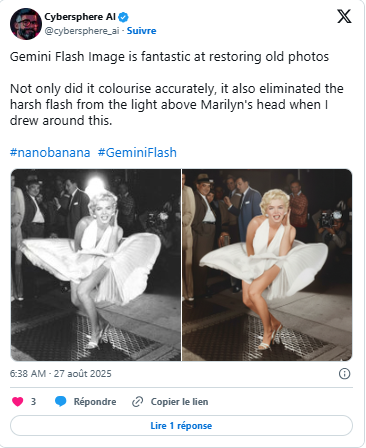


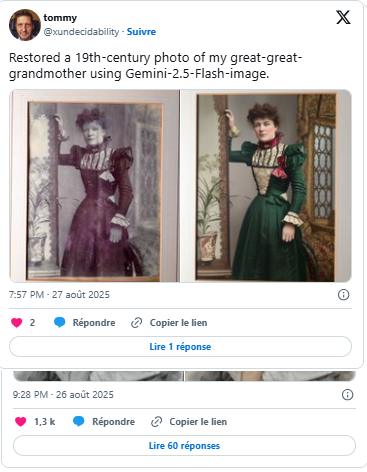

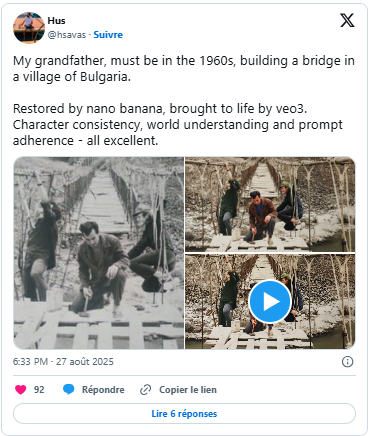
Beyond the technical feat, it is an emotional experience: AI colorization becomes a means of passing down family history, educating others, or commemorating the past.
How do I colorize photos with Gemini?
Here's how to enable this feature step by step:
- Open Google Photos (on your phone or computer) and select a black-and-white photo (scanned or imported).
- Click the "Suggest with Gemini" or "AI Help" button (this feature is being rolled out gradually by region).
- Select the "Colorize photo" option from the suggestions.
- Let the AI generate a colorized version in just a few seconds.
Note:
- This feature may require a Google One Premium account or setting Gemini as your default assistant2.
- It is currently available in English, French, Spanish, Portuguese, and Japanese.
- AI does not replace the original photo, but generates an alternative version of it.
What are the technical and ethical challenges?
While automatic colorization is impressive, it has several limitations and raises a number of questions:
- Risk of anachronism: AI may assign incorrect colors (military uniforms, religious garments, historical flags).
- Aesthetic standardization: the colors produced can blur the cultural or symbolic differences of an era.
- Transparency: It is essential to indicate when a photo has been altered by AI, particularly in museum or educational settings3.
In short, AI can enrich our collective memory, but it must do so within a clear ethical framework, with a focus on traceability and respect for historical sources.
AI in the Service of Memory and Preservation
With this feature, Google is taking another step forward in making artificial intelligence more human. By restoring color to forgotten faces, streets of yesteryear, and moments of life frozen in time, Gemini bridges the past and the present—without attempting to rewrite history.
There are numerous educational applications: in history, anthropology, and archival science. Families find it a useful tool for preserving their photo albums. And heritage enthusiasts find it an accessible restoration technology—provided they understand its limitations.
Learn more
See also: When Artificial Intelligence Revolutionizes Video: Veo 3, Augmented Cinema
A look at another Google technology that is redefining imagery through AI, this time in the realm of video.
References
1. Google. (2025). Colorize photos with Gemini AI in Google Photos.
https://support.google.com/photos/colorize
2. The Verge. (2025). Gemini now brings color to your black-and-white memories.
https://www.theverge.com/gemini-photo-colorization
3. Wired. (2025). The ethics of AI-powered photo restoration and colorization.
https://www.wired.com/story/ai-colorization-ethics